Stay in control of the email sent with your domain
Alignmarc reads your DMARC reports to identify the services using your domain to send email: mailboxes, CRM, billing, newsletters, internal tools…
You learn which ones are set up correctly, which ones need fixing, and whether unknown sources are using your domain.
First results usually available within 24 to 72 hours.
One line to add to your DNS is enough. Nothing to install, and no change to your mail system.
Find every service using your domain
Over time, it becomes hard to know exactly which services still send email on behalf of your company.
Microsoft 365 or Google Workspace are easy to spot. But there is also the CRM set up three years ago, the billing tool the accounts team uses, an old marketing platform, or a service a contractor added one afternoon.
Alignmarc gathers all of it and makes it readable.
You can then tell apart, at a glance, what is normal, what deserves a fix, and what has no business being there.
DMARC policy
Do you know whether you can turn on a strict DMARC policy?
This is often the delicate part. Turning on p=quarantine or p=reject too early can block legitimate email. Never turning it on leaves your domain less protected against spoofing.
Alignmarc reads your sending sources and tells you whether your domain is ready. If it is not there yet, you see exactly what is left to fix. When it is, we give you the DMARC record to publish.
Share of your email authenticated and recognised
- With Alignmarc
- DMARC published, never read
- First reports
- Senders identified
- Alignment fixed
- Reject turned on
An illustration of the mechanism, not a customer average. How long it takes you depends on how many senders need putting right.
No need to read DMARC reports
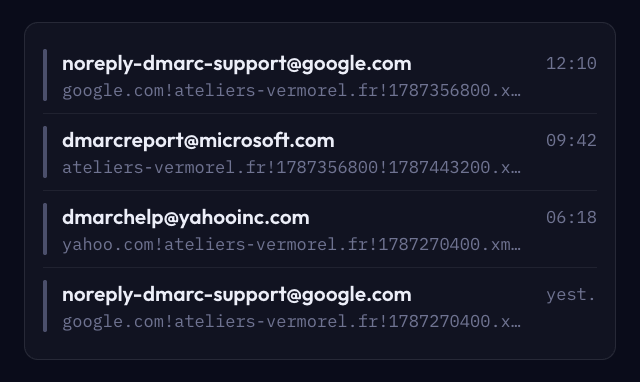
DMARC reports are technical files full of IP addresses, domains and SPF or DKIM results.
Alignmarc does that work for you.
An IP address is matched to its service wherever possible. Volumes are grouped. Authentication problems are flagged, and unknown sources are set apart so you can check them.
So you do not need to become a DMARC specialist to know what is happening on your domain.
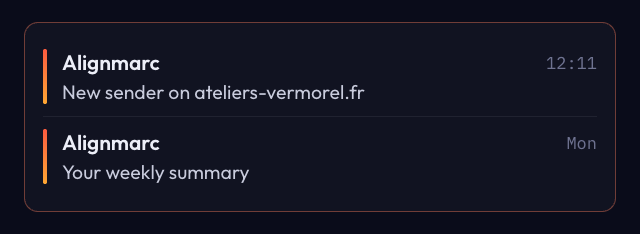
These emails arrive every day, one per receiver, and nobody opens them. Alignmarc reads them for you, and writes you a single sentence only when there is something to say.
How does it work?
STEP 1
Add Alignmarc to your DMARC record
We give you the line to add to your DNS.
If you already have a DMARC record, your current settings are kept. Alignmarc is simply added as a recipient of the reports.
This does not change how your email is delivered.
STEP 2
Let the reports come in
Google, Microsoft, Yahoo and the other providers send us their reports as they go.
The first data usually shows up within 24 to 72 hours.
Alignmarc reads it and groups the sending sources so they make sense.
STEP 3
Check and fix
You confirm the services you recognise.
If an SPF or DKIM setting is wrong, you know which one to fix. If an unknown source shows up, it is highlighted.
Once your legitimate sources authenticate properly, you can tighten your DMARC policy with more confidence.
The product
What you get in Alignmarc
Your sending sources
Every service detected on your domain, in one place, with its volume and its authentication state. The point is not to hand you a list of IP addresses, but to help you understand which service sits behind each send.

An alert when a new source appears
Once your domain is clean, Alignmarc keeps watching it. If a new service starts sending email with your domain, you can check it before it becomes a problem.

The verdict
The state of your DMARC protection
For each domain, Alignmarc says whether the conditions are met to tighten your policy. If they are not yet, what is holding you back is spelled out, one item at a time.
The score and the checklist are recalculated with every report received. You never have to work out the right moment yourself.

Legitimate senders are not aligned yet: tightening the policy now would make their emails disappear.

Every condition is met: Alignmarc hands you the DMARC record to publish.
The deliverable
A report you can actually hand over
You can generate a PDF report summarising:
- the services detected;
- their authentication state;
- any anomalies;
- the domain’s compliance level;
- the state of the DMARC policy.
The report is dated and written in plain language. It can go straight to a manager, a client or a contractor without giving them access to Alignmarc.

Pricing
The first domain is free.
No card required. Yearly billing: two months free.
Discovery
For a freelancer, one domain.
- 1 domain
- 1,000 messages analysed a month
- 30 days of history
- Alerts grouped every 24 h
- Documentation
Pro
For a company of up to 100 people.
- 5 domains
- 100,000 messages analysed a month
- 12 months of history
- Real-time alerts, 3 recipients
- PDF export, 3 users
- Email support within 48 h
Enterprise
For an organisation of up to 1,000 people.
- 25 domains
- 1,000,000 messages analysed a month
- 24 months of history
- Unlimited alert recipients
- PDF export, 10 users
- Priority support within 24 h
Included in every plan, no exception
- Inventory of named senders
- Compliance rate and current policy
- Tightening verdict with named blockers
- Sender triage
- Weekly digest
- Alerts on unrecognised senders
| Who it is for | Discovery A freelancer, one domain | Pro A company of up to 100 people | Enterprise An organisation of up to 1,000 people |
|---|---|---|---|
| Monthly price | €0 | €29/month | €99/month |
| Yearly price (−20%) | €0 | €23/month | €79/month |
| Domains | 1 | 5 | 25 |
| Messages analysed / month | 1,000 | 100,000 | 1,000,000, then on quote |
| History | 30 days | 12 months | 24 months |
| Alerts | Grouped every 24 h | Real time | Real time |
| Alert recipients | 1 | 3 | Unlimited |
| PDF export | No | Yes | Yes |
| Users per account | 1 | 3 | 10 |
| Support | Documentation | Email, 48 h | Priority email, 24 h |
More than 25 domains, sub-accounts or white labelling? See the tailored plan
Agencies and resellers: on quote, with no public plan at launch.
Prices exclude tax. Applicable VAT is added at checkout.
For agencies and IT providers
Track authentication for all your clients from one place.
If you manage domains for several clients, Alignmarc lets you follow their authentication from a single tool. Reports can carry your own branding, so you can pass them straight on to your clients.
You keep the client relationship; Alignmarc stays the technical tool behind your work.
- Unlimited domains
- A sub-account per client
- White-labelled PDF report
- Priority support
- Scoping and onboarding
Frequently asked questions
No. Alignmarc receives a copy of the DMARC reports generated by mail providers. Your email keeps going out exactly as it does today.
Yes. Your current policy is kept. We simply add Alignmarc to the recipients of your DMARC reports.
No. We receive neither the content of your messages nor your attachments. The reports we use contain mainly the sending sources, the volumes, and the SPF and DKIM authentication results.
Alignmarc data is hosted in France. Report reception goes through European infrastructure.
Usually within 24 to 72 hours. The delay depends on the providers that generate the DMARC reports.
Start with your own domain
Add your domain and find out which services really send email in your name. The first domain is free and no credit card is needed.
The first domain is free.
Get started